This is the advanced version. It needs Zotero, Better BibTeX, a pandoc built with HTTP support, and — for Overleaf — git and a premium token. That is roughly twenty minutes of setup before anything runs. If you are following the Week 4 session, you want Demo 10 instead, which does the same work with a PDF folder, a .bib file and a browser upload. Come back here when you want the full system.
This one is different from the earlier research demos. The earlier research demos (previously 10–13) ran on synthetic corpora with planted defects, offline, with nothing installed. This one uses three real papers and your real Zotero, and finishes with a .docx — or a .tex — you could actually submit. It needs about twenty minutes of setup. That is the trade.
The whole workflow, on one page
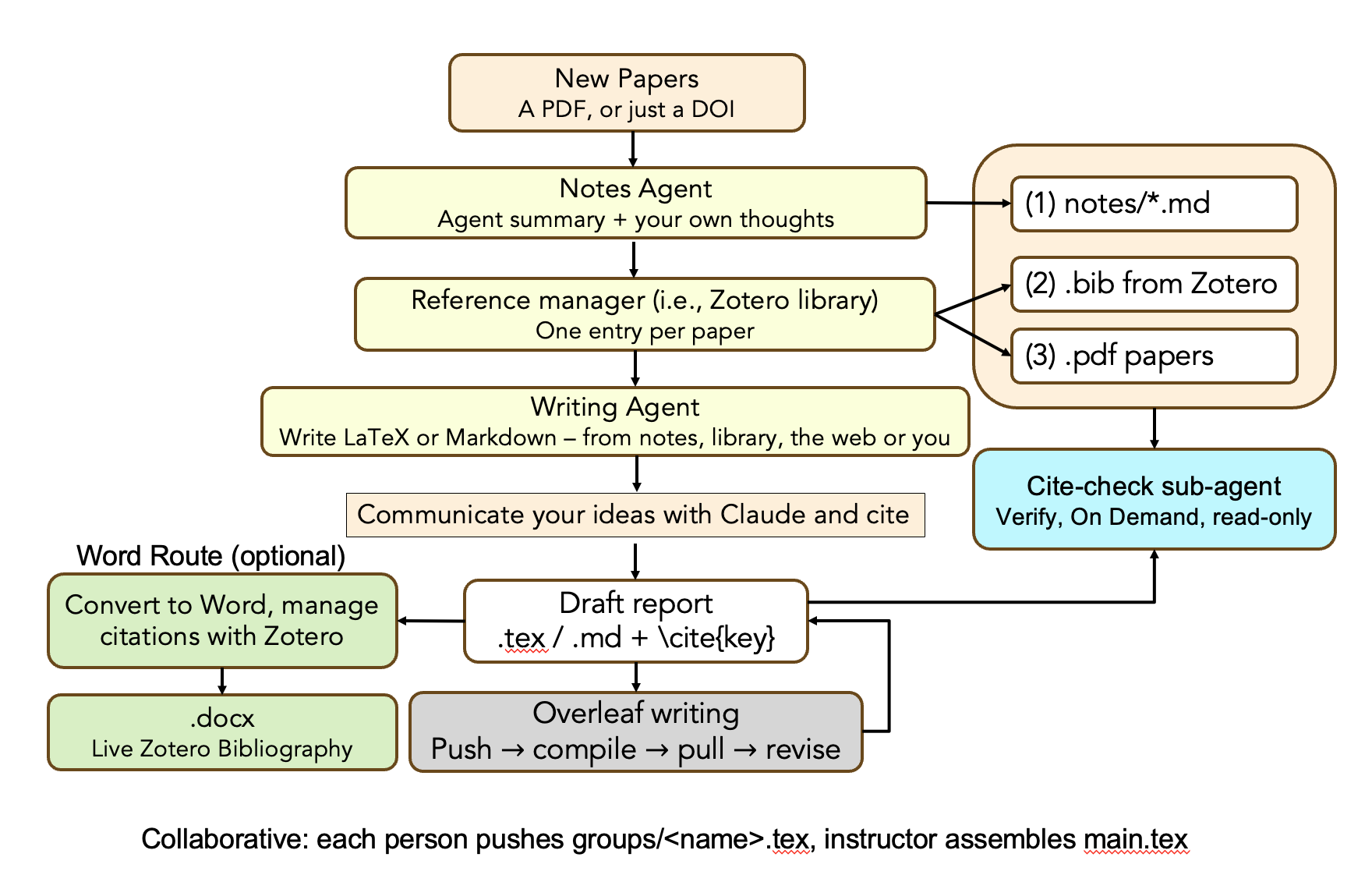
Three things are worth reading off the picture before you type anything.
The left column is work; the right column is what ends up on disk. The pipeline runs top to bottom, and at two points it deposits something durable: the Notes Agent writes notes/*.md, and Zotero yields both a .bib and the PDFs themselves. Those three files are the only evidence that survives the session.
Cite-check has arrows going in and none coming out. It reads all three files plus your draft, and it emits a report. It has no Write tool — not a rule it follows, a tool it does not have. A verifier that can edit is one that can make its own findings disappear.
The numbers (1) (2) (3) are an order, not a list. Cite-check reads your notes first, joins cite key to DOI through the .bib second, and opens a PDF only when the first two cannot settle the claim. On a hundred-citation manuscript that ordering is the difference between about 155k tokens and about 11M.
The stages: 0 Setup · 1 New papers · 2 Notes agent · 3 Reference manager · 4 Writing agent · 5 Cite-check · 6 Overleaf · 7 Word · 8 Word, back again
How to use this page. Each stage is do this, then check it — a command and the output you should see. Run the checks. Every one of them exists because something failed silently here first, and a silent failure in a citation is the only kind that reaches a reviewer.
What you end up with
A folder you keep. Drop a PDF in, get a structured note out. Ask the library a question and get an answer that says what it cannot support. Draft a paragraph where every claim carries the kind of source behind it. Then publish to Overleaf, or to Word with citations Zotero still owns — so you can restyle for a different journal, add a citation by hand, send it to a co-author, and have Refresh keep working.
papers/      PDFs in, notes out, one index, one library export
writing/     drafts — markdown or LaTeX — then Word or Overleaf
tools/       scripts that check things
.claude/     four subagents, five skills, one permission boundary
CLAUDE.md    the contract
QUESTIONS.md what you are trying to find out. Numbered.
Four subagents, five skills, eleven scripts. Nothing else — no projects, no proposals, no topic syntheses. The package does one thing.
Stage 0 · Before the session, at home
Ten minutes. Doing it in the room costs everyone the interesting half.
- Unzip it and run the doctor.
It prints what is installed, what is missing, and the exact command for each gap, grouped by how much you lose without it. Only the Core block has to pass before you arrive —cd Demo10x_research_paper_with_zotero tools/doctor.shpython3andpython-docx.Windows: install Git for Windows first and run everything from Git Bash. Every tool here is a shell script; PowerShell will not run them.
- Install Zotero 7 and Better BibTeX. Get the BBT
.xpifrom its GitHub releases page — in Firefox, right-click → Save Link As, because a left-click installs it as a Firefox extension instead. Then Zotero → Tools → Plugins → gear → Install Plugin From File.In Zotero 6 that menu was Add-ons. Zotero 7 renamed it to Plugins, and most tutorials still say the old name. This trips up nearly everyone.
Check it, with Zotero open:curl -s http://127.0.0.1:23119/connector/ping curl -s 'http://127.0.0.1:23119/better-bibtex/cayw?probe=1'The second must print
ready. If the first is silent, Zotero is not running; if the first answers and the second does not, BBT is not installed. Two different failures, and the scripts tell them apart. - Add the three papers by DOI. In Zotero, the green Add Item by Identifier wand. Paste all three at once — the wand accepts a multi-line list:
All three are CC BY 4.0, so the PDFs should arrive with the metadata. Stage 1 explains what to do when one does not.10.1038/s41598-023-49831-6 10.3390/jpm12050717 10.31083/RCM33425 - If you want the Word half (recommended, and the part most people have never seen work), do the pandoc step in
SETUP.md §11. Two downloads, about a minute.doctor.shprints the exact commands. - One line before an agent touches anything.
Still the most useful line in any of these demos. Every step afterwards isgit init && git add -A && git commit -m "before the agent"git diffaway from being reviewed andgit checkout .away from being undone.
Stage 1 · New papers → a PDF Zotero actually holds
The first box on the diagram says a PDF, or just a DOI, and the difference between those two matters more than it looks.
A DOI makes a paper citable. A PDF makes it checkable. A note makes it yours. Each of the three buys you exactly one of those, and the rest of this page is about not confusing them.
What Zotero does with a DOI
Add Item by Identifier fetches the metadata and then automatically tries to find the PDF. It loads the page behind the DOI, tries access you already have, and then looks for an open-access copy. This is the same lookup as the Find Full Text right-click item, run for you.
Zotero's own manual is silent on this; the behaviour is stated by Zotero staff on the forums. An earlier version of this page said the wand fetched metadata only. That was wrong, and the correction matters, because it changes what an empty storage/ folder means.
So a DOI-built library is not fileless by design. It is unevenly filled, and the gaps are silent:
| case | does a file arrive? |
|---|---|
| open access, and Unpaywall knows about it | usually yes |
| your institution subscribes, IP- or VPN-authenticated | often |
| your institution subscribes through a web login proxy (an EZproxy sign-in page) | no — the desktop app cannot drive a browser-based proxy |
| hosted on an aggregator (EBSCO, ProQuest, JSTOR) | no |
| paywalled with no open-access copy | no |
Attaching the PDF yourself, when it did not arrive
Right-click the item → Add Attachment. Zotero 7 gives you three options and the first is the one you want:
| option | where the file lives | can Claude read it? |
|---|---|---|
| File | copied into ~/Zotero/storage/<key>/, managed and synced by Zotero | yes |
| Linked File | stays where it already is — Downloads, Desktop, a network share | no |
| Web Link | nothing on disk at all | no |
Dragging a PDF onto the item in the centre pane does the same thing as File.
Use File, never Linked File. Your .claude/settings.json grants additionalDirectories: ["/Users/you/Zotero/storage"] and nothing else. A linked file in ~/Downloads is a path Claude is not permitted to open.
And the failure is a bad one: the CSV's File Attachments column records the path either way, so the library reports a file, citecheck cannot read it, and it looks like the tool is broken rather than the attachment being the wrong kind. Linked files also do not sync.
Where it lands — and the key that confuses everybody
A stored file goes to <Zotero data directory>/storage/<key>/<filename>.pdf. The trap is which key:
the paper's item key        RDEWFSFF     ← this is in your CSV and your notes
the storage folder          UD9ILPQB     ← this is the ATTACHMENT's key
They are different keys and the second one appears in no export. That asymmetry is why a library with 48 PDFs shows 48 folders under storage/ and not one of their names matches a row in your CSV. People conclude their export is broken and re-export in a loop.
The join that does work is the CSV's File Attachments column, which carries the full path. That is what tools/check_notes.py reads — never the key space.
Then re-export. Every time.
library.csv and library.bib are snapshots. Until you re-export, the workspace still believes that item has no file.
Right-click My Library → Export Library — not the collection. A collection exports only its own items while storage/ holds attachments for everything, so you get a handful of rows against hundreds of folders and every lookup outside the collection fails with no error at all. Group libraries are not included in a My Library export either.
If it says 0 of 4, you re-exported before attaching, or you exported the collection. If it says 1 of 400, you exported the collection.
Stage 2 · Notes Agent → (1) notes/*.md
Drop the PDF where the agent looks, then ask:
cp ~/Zotero/storage/UD9ILPQB/Horne*.pdf papers/inbox/
claude
/agents # you should see: librarian, citecheck, drafter, proseWatch the order it works in, because the order is the design:
- Duplicate check on DOI first — not title, which gets retyped, and not the cite key, which regenerates. Already filed? It writes no second note, reports the existing one, and quotes your
## My takeback at you. - Reads
papers/library/MANIFEST.mdto learn which metadata file holds the keys and how a key becomes a path. Every Zotero-specific fact in the workspace lives in that one file. - Writes the note, then one row in
papers/_index.md, then rebuilds the generated view.
The librarian cannot fetch anything. Its tool list is Read, Write, Glob, Grep, Bash — no WebSearch, no WebFetch, and curl is not on the Bash allow list. Zotero does the fetching; Claude does the reading. This is deliberate: a librarian that can browse will write a fluent, confident note from an abstract or a publisher blurb, and that note is indistinguishable from one written from the paper. Note that drafter does have web tools. The writer may browse; the filer may not.
Check it — with a tool that repairs nothing
python3 tools/check_notes.pyTen required sections, a DOI, a matching index row, a resolvable attachment path. It reports and fixes nothing, deliberately. A checker that edits is one that can make its own findings disappear.
Run this from your own machine. Zotero listens on 127.0.0.1 and ~/Zotero/storage is outside any shared folder, so a cloud or bridged session will report every attachment as missing — a false negative that looks exactly like a real one.
Read the note like a reviewer
Two things to look at, and they are the whole reason the template is shaped this way.
## My take is empty. It always is. No agent writes there. In six months it is the only section you can trust to be your own thinking.
## Problem and aim comes before ## Claim. A note that opens with the claim has already accepted the paper's framing. What did the authors think was missing, and was the gap real?
Two more papers, then look at the shape
python3 tools/build_views.pypapers/notes/ is flat — no subfolders. A note carries area: in its frontmatter and that field holds two values, while a folder holds one. So the generated view puts a two-area paper under both headings, which is the thing a folder cannot do.
The test before you ever add a subfolder: can a paper be in two of these at the same time? If yes, it is a field, not a folder. inbox/ is a folder because unprocessed is a state a paper is in exactly one of. Folders may encode lifecycle, never classification.
Stage 3 · Reference manager → (2) .bib and (3) .pdf
One Zotero library produces both of the remaining files on the right of the diagram, and they do different jobs. The .bib is what a \cite{key} resolves against. The PDFs are what a claim gets checked against. Metadata is enough to cite a paper and not enough to check one.
The three joins that have to line up
Four identifiers are in play and it is worth knowing which survives what:
| identifier | example | lives in | survives |
|---|---|---|---|
doi | 10.1160/TH11-06-0388 | note, CSV, .bib | everything — the only cross-tool identifier |
item_key | RDEWFSFF | note, CSV Key | this Zotero library |
| attachment key | UD9ILPQB | storage/ folder name only | nothing — never appears in an export |
| cite key | hornePharmacogenetic…2012 | .bib, your \cite{} | only if you pin it |
Pin the keys you cite. In Zotero: the item → Extra → Citation Key: horne2012warfarin. Better BibTeX regenerates an unpinned key when you fix metadata, and a regenerated key silently breaks every \cite already written. Pinning is the only thing that makes the fourth row of that table safe.
Let Claude read your PDFs
They live in ~/Zotero/storage/, outside the project. Add the absolute path — no tilde — to .claude/settings.json:
"additionalDirectories": ["/Users/YOURNAME/Zotero/storage"]The data directory is relocatable (Settings → Advanced → Files and Folders). If you ever move it, this line has to move with it or every PDF read fails at once.
Keep exactly one .bib per destination
This is the mistake that scales worst, and it is nearly invisible until a room full of people hits it at once.
papers/library/library.bib              17:11   has file =    ← just re-exported
writing/tex/my-paper/library.bib        05:07   no file =     ← stale by 12 hours
Two files, both defining hornePharmacogeneticWarfarinDose2012. The everyday problem is drift: a paper you add today resolves in one and not the other. The sharp problem is what happens if both reach the same build — bibtex reports Repeated entry, latexmk exits 12, and every citation in the document renders as (?) while the reference list disappears entirely — not just the duplicated entry. One person's duplicate breaks everybody's PDF. (Measured 2026-10-04 with natbib/plainnat. A .bbl is still written, with the duplicate dropped, but latexmk stops before the pass that would use it — which is why the bibliography vanishes rather than merely losing one row. An earlier version of this page said [?]; that is the marker for a missing key under the default style, not for this failure.)
The fix is to have one generator per destination. Point Better BibTeX's Keep updated export straight at the file your LaTeX project uses, and let it maintain itself:
right-click My Library → Export Library → Better BibTeX
  → tick "Keep updated"
  → save as writing/tex/<project>/library.bib
tools/tex-assemble.sh catches cross-file duplicates before a push and names both owners, which is why the collaborative session uses it.
Untick the file field before you share a project. A Better BibTeX export records the attachment as file = {/Users/jiehou/Zotero/storage/UD9ILPQB/…}. LaTeX ignores it, so you lose nothing by omitting it — but if you do not, your home directory path ships to every collaborator in the shared Overleaf project.
Stage 4 · Writing Agent → the draft
The box on the diagram says from notes, library, the web or you, and it means it. The drafter subagent's own first line is “No fixed source, no fixed shape”, and unlike the librarian it does have WebSearch and WebFetch. Your notes are an available input, not a required one.
What does not vary is that every claim declares where it came from:
| tier | marker | what it means |
|---|---|---|
| note | {Horne, 2012} | in your library and you have read it — there is a note with ## Evidence. May quote numbers. |
| library | {Saon, 2022 ·unread} | in your library; the agent read the PDF just now. You have not. May quote a number, but must say which table. |
| web | [WEB:1] | found online, not in your library, may not be peer reviewed. May not state a number as established fact — it must be attributed. |
| none | [GAP: …] | nothing supports this. Say so; do not write the sentence smoothly anyway. |
So the shape is an asymmetry, not a constraint: free to write from anything, not free to cite anything. A \cite{key} only resolves against the .bib, and that is enforced in two places — tools/tex.sh fails on an undefined citation, and tools/render.sh live fails when the field count does not match the citation count.
A [WEB:1] is settled by sending it round the diagram again. Decide the source is worth keeping → add it to Zotero → it re-enters at New papers → re-export → now it is a real \cite{}. That is the loop the right-hand column exists to close, and it is why web findings are marked rather than cited.
Ask it for a section, not a topic
“Write an introduction” produces the generic one a model can write without reading anything. “The second paragraph, on whether X” produces a paragraph that has to rest on something. In LaTeX the non-citation markers go in % comments so they never typeset:
... raised explained variance from 61.2\% to 69.1\%
\citep{hornePharmacogeneticWarfarinDose2012}.
% [GAP: error stratified by achieved INR band — no source opened reports it]
Leave the gaps in. They are the paper telling you which search or experiment is still owed. Deleting them so the draft reads finished is the single move that turns an honest draft into a confident wrong one.
Before that: ask the library something it cannot answer
The honest answer is that no source here separates that out. You should get [GAP:] markers, not a synthesis. If three papers produce a smooth, complete answer, something invented the rest — and noticing that is worth more than anything else on this page.
Stage 5 · Cite-check — verify, on demand, read-only
Nothing triggers this automatically. You invoke it, typically per section while drafting and once in full before you submit.
prose reads only the draft. citecheck works the numbered order on the diagram:
- Your notes first. A claim whose number is recorded in a note's
## Evidencesection is settled there, for a few hundred tokens. - The
.bibsecond, to join cite key → DOI → note. This is a lookup, not reading. - The PDF only if the first two cannot settle it. Even then it does not read the whole paper:
pdftotextinto a cache, grep for the figure,seda window around the hit.
It distinguishes confirmed by a note you wrote from confirmed by a note nobody has read from confirmed in the PDF — the middle one is fidelity to your note, which is not the same as truth.
It re-checks every claim, every run. There is no “already verified” skip.
That is a deliberate choice against the obvious optimisation. tools/cite-ledger.py keeps a record of what was verified and when, and that record is context, not a skip list — a verdict that changes between runs is a serious finding, and you only ever see it if you re-run.
Cache the extraction, never the conclusion. Re-extracting a PDF gives byte-identical text, so .cache/pdftext/ is free and risk-free and it is where the expensive part actually lives. A cached judgement is somewhere false confidence hides: if the invalidation logic is subtly wrong, the ledger asserts “verified” for a claim that has since changed, silently. An unverified claim is a known unknown. A wrongly-cached one is a trap.
What that costs, so it is on the record: a full hundred-claim sweep is roughly 155k tokens and about thirteen minutes. Per-section while writing, it is seconds. It is affordable only because the extraction cache and the note-first ordering already removed the parts that were expensive for no good reason — the naive version of the same sweep is about 11M tokens.
Expect several cannot verify verdicts and treat them as correct. Then edit yourself:
Prove it cannot write
head -6 .claude/agents/citecheck.mdLook at the tools: line — Read, Glob, Grep, Bash. There is no Write. Now ask it to fix something:
It reports. It cannot fix. It did not decide to behave — there is no tool to ask about. That is the bottom of the three layers, and it is the only one that cannot be talked out of.
Stage 6 · Overleaf — push, compile, pull, revise
Many of you do, and this is the easier half of the demo, not a workaround. Everything up to the draft is identical — same papers/, same notes, same librarian, same citecheck. Only the last step changes, and it changes in your favour.
| Word route | LaTeX route | |
|---|---|---|
| source of truth | flips to the .docx at handoff | the .tex, always |
| can an agent edit the final form? | only as tracked changes | yes, directly |
| round trip | impossible — pandoc destroys field codes | it is plain text |
| library drifting out of date | manual re-export, easy to forget | auto-export keeps it in sync |
| diffs | binary | readable |
There is no one-way door. Write .tex from the first line and keep editing it forever — the whole “markdown drafts, then a Word endgame” discipline simply does not apply.
Setup is two things. Export from Zotero as Better BibTeX and tick Keep updated — BBT then re-exports whenever the library changes, so the .bib cannot drift. And pin your cite keys in each item's Extra field (Citation Key: smith2024), because BBT regenerates a key when you fix metadata, silently breaking every \cite already written.
tools/tex.sh writing/tex/paper.tex           # compile and check
tools/tex.sh writing/tex/paper.tex --look    # render each page to PNG
The check that earns the script: latexmk exits 0 on an undefined citation.
Verified here. A one-character typo in a cite key produced a 68 KB PDF, exit status 0, a ? where the citation should be, and that reference missing from the bibliography. Nothing failed, nothing warned on screen. You would find it at proof stage — or a reviewer would.
It also fails on undefined \ref targets, and reports open [GAP:] markers without failing on them. One more trap, for anyone checking the log by hand: LaTeX wraps warnings across lines mid-word — undef / ined — so grep undefined paper.log finds nothing on a file that has them. tex.sh flattens the log first.
--look writes one PNG per page and prints the paths, so you can ask Claude to read the rendered pages. Worth doing: a PDF that compiles is not a PDF that is right. A table running off the page, a figure that lost its caption, and a bibliography in the wrong style all compile cleanly.
Overleaf specifically
Overleaf's Git integration is a premium feature — not on the free plan, though many universities hold an institutional licence, so check yours rather than assuming either way.
With Git access, this is the best setup in the whole demo:
git clone https://git.overleaf.com/<project-id> writing/tex/<name>
cd writing/tex/<name> && claude
Claude Code works directly in the clone, you push, Overleaf shows the result. Overleaf compiles for you, so a local TeX install is optional — though running tex.sh locally still gives you the undefined-citation check, which Overleaf's compiler will not fail on either.
Without Git access, do not fight it: write and compile locally, and move files at the boundaries — download the project as a ZIP to start, upload the changed .tex and .bib at the end. Dropbox and GitHub sync are premium too, so there is no free automatic path. Either way keep library.bib generated by Better BibTeX rather than hand-edited in Overleaf: one generator, one direction, no merge conflicts in a file nobody writes by hand.
A local TeX engine, if you want one: brew install --cask basictex is about 100 MB and enough. Tectonic is a single binary that fetches packages on demand. MacTeX is ~5 GB and you do not need it. tools/doctor.sh reports what you have.
The full LaTeX cycle in Claude Code — what to actually type
Everything below was run end to end against a live Overleaf project before being written down. The prompts are verbatim; use them as they are.
Day zero — once per project
# 1. tell git to remember the Overleaf token in the keychain, not a file
git config --global credential.helper osxkeychain

# 2. clone (Overleaf: Menu → Sync → Git → Generate token)
cd ~/research/writing/tex
git clone https://git@git.overleaf.com/<project-id> <name>
#    password prompt = the TOKEN, not your SSO password. Once only.

# 3. the bibliography, from Zotero: right-click My Library → Export Library
#    → Better BibTeX → TICK "Keep updated" → save as papers/library/library.bib
cp ../../../papers/library/library.bib <name>/library.bib

cd <name> && claude
The mistake everyone makes first. Run git push one folder too high and you get:
writing/tex/ belongs to your research repo, which has no remote. The Overleaf clone is the folder inside it. Two repos, nested, and git silently operates on whichever one encloses your current directory. cd into the clone. If you are ever unsure: git remote -v — Overleaf's URL means you are in the right place.
Every session — the loop
git pull          # FIRST. a co-author may have edited in the browser
claude            # from inside the clone
                  # ... work ...
git push          # silent; the keychain supplies the token
Pull first is not optional etiquette. Overleaf rejects a non-fast-forward push, and untangling that mid-session is the one part of this workflow that genuinely wastes time.
Writing
Name the section, not the topic. “Write an introduction” produces the generic one that a model can write without reading anything; “the second paragraph, on whether X” produces a paragraph that has to rest on something.
What comes back carries a tier on every claim, and in LaTeX the ones that are not citations go in % comments so they never typeset:
... raised explained variance from 61.2\% to 69.1\%
\citep{hornePharmacogeneticWarfarinDose2012}.
% [GAP: error stratified by achieved INR band — no source opened reports it]
Leave the gaps in. They are the paper telling you which search or experiment is still owed. Deleting them to make the draft read finished is the one move that converts an honest draft into a confident wrong one.
Citing
It searches your library and returns the key, or says it has nothing — which is the useful answer. It will not write a formatted reference, because formatting is BibTeX's job and a hand-typed one goes stale.
Pin the keys you cite. In Zotero: the item → Extra → Citation Key: horne2012warfarin. Better BibTeX regenerates unpinned keys when you fix metadata, and a regenerated key silently breaks every \cite already written.
Compiling — and the check that is the whole point
tools/tex.sh writing/tex/<name>/main.tex --lookMeasured on this exact project: a one-character typo in a cite key (2012 → 2O12) gave latexmk exit status 0, a PDF that built fine, a ? where the citation should be, and that reference missing from the bibliography. Nothing failed.
Overleaf's compiler will not fail on this either. That is why the local check is worth keeping even when Overleaf does your compiling.
--look writes one PNG per page. Then:
This is the step people skip. A table running off the page, a figure separated from its caption, and a bibliography in the wrong style all compile perfectly.
Revising
citecheck opens the actual PDFs in your Zotero storage and checks each claim against its source. prose reads only the draft. Neither has a Write tool — they report, you decide. A verifier that can edit is one that can make its own findings disappear.
Expect several cannot verify verdicts and treat them as correct. Then edit directly — this is LaTeX, so there is no tracked-changes dance:
Finishing
git add -A && git commit -m "Introduction: ..." && git pushDo not commit main.pdf. Overleaf compiles it, so a committed PDF is a stale binary that conflicts on every pull. The .gitignore in the package covers it along with *.aux, *.bbl, *.log and the page PNGs.
Worth asking before you push, since git diff is the only review that matters:
Should Claude push on its own? The package allows git push and denies --force. The reasoning: an ordinary push is recoverable — git keeps history and Overleaf keeps its own — while a force push is not. On a solo draft, let it push. On a manuscript with co-authors, consider removing Bash(git push:*) from the allow list so the last step is always yours; a push is visible to other people the moment it lands.
Stage 7 · Either source → Word, fields still live
You can go to Word from markdown or LaTeX, and the Word file that comes out has real Zotero field codes in both cases — the kind you can Refresh, restyle from APA to Vancouver, and hand to a co-author who has never heard of pandoc.
This surprised me, so it is worth saying why it works. The zotero.lua filter acts on pandoc's Cite nodes and branches on the output format. The input format never enters into it, and pandoc's LaTeX reader produces exactly the same nodes as its markdown reader:
markdown  [@horne2012; @kimmel2013]     →  ids=[horne2012,kimmel2013]  mode=Normal
latex     \citep{horne2012,kimmel2013}  →  ids=[horne2012,kimmel2013]  mode=Normal
markdown  @horne2012                    →  mode=AuthorInText
latex     \citet{horne2012}             →  mode=AuthorInText
latex \citep[p.~5]{horne2012} → suffix=[p. 5]\autocite, \parencite, \textcite and \citeauthor all work too, and \input{groups/bob} is followed — so an assembled main.tex converts in one pass, co-authors' sections and all.
Test it yourself — ten minutes
Zotero must be open with Better BibTeX installed, for the whole of this. The filter queries it live over 127.0.0.1:23119; nothing is cached. If Zotero is shut, render.sh stops before pandoc runs and tells you which of the two is missing.
Write the same four sentences twice, once each way, using cite keys that are really in your library.
# writing/drafts/test.md
Accuracy improves with genotype [@yourkey2012].

Both trials disagreed [@yourkey2012; @otherkey2013].

@yourkey2012 argued the opposite.

See the appendix [@yourkey2012, p. 5].
# writing/tex/test.tex
\documentclass{article}
\usepackage{natbib}
\begin{document}
Accuracy improves with genotype \citep{yourkey2012}.
Both trials disagreed \citep{yourkey2012,otherkey2013}.
\citet{yourkey2012} argued the opposite.
See the appendix \citep[p.~5]{yourkey2012}.
\end{document}tools/render.sh live writing/drafts/test.md
tools/render.sh live writing/tex/test.texEach should end on the same line, with the same number:
Now open each .docx and do the three Word steps, in this order:
- Zotero tab → Document Preferences → OK. Pick your style here.
- Put the cursor where the reference list belongs, then Zotero tab → Add/Edit Bibliography.
- Refresh.
Step 2 is not optional and nothing warns you about it. The filter writes citation fields only; the bibliography is a separate Zotero field that only the Word plugin can insert. Skip it and Refresh succeeds silently with no reference list, which looks like a failure and is not. Doing Preferences after Refresh gives you a confirmation popup for every single citation.
The proof that the fields are real: change the style in Document Preferences and hit Refresh. Every citation and the whole reference list rewrite themselves. Static text cannot do that.
Three things to expect
Before you Refresh, a LaTeX-sourced file shows empty placeholders. Markdown gives you <Do Zotero Refresh: [@horne2012]>; LaTeX gives you <Do Zotero Refresh: > with nothing inside. The field underneath is identical and Refresh fills both. It only means you cannot tell the citations apart by eye until you have refreshed once.
\ref resolves; \eqref does not. Section~\ref{sec:methods} becomes “Section 1” and Figure~\ref{fig:one} becomes “Figure 1”, correctly numbered. \eqref{eq:dose} comes out as the literal [eq:dose]. Use plain \ref in anything headed for Word.
An in-text citation leaves the author name as plain text. \citet{horne2012} becomes Horne et al. followed by a suppress-author field. The field is live; the two words in front of it are not, so a later restyle in Zotero will not rewrite them. That is the price of having the citation at all — see below.
The silent failure this replaced, in case you have older output lying around.
Until now render.sh called pandoc with no metadata, which left the filter's author-in-text setting off. With it off an in-text citation gets no field at all, and the two source formats fail differently:
Nothing warned in either direction. The Word file opened, looked finished, and was wrong.
Two fixes, both in the script now. The metadata is passed properly — and note that -M zotero.author-in-text=true does not work, because pandoc's -M cannot build a nested key and silently sets a flat one of that literal name. And render.sh now counts the citations going in and the fields coming out, fails if they differ, and deletes the bad .docx. A half-cited file sitting next to a good one is a file somebody emails.
You can watch that check work by typo-ing one key on purpose:
Figures, tabular environments and equations survive the LaTeX route as well: images carry over, tables become real Word tables, and \begin{equation} becomes a native Word equation rather than a picture of one.
This does not make the round trip work. Going to Word is fine from either source. Coming back — .docx → .md → .docx — still destroys every field code and every image, exactly as measured further up this page. Once you hand off to Word the .docx is the source of truth and Claude edits it through tools/docx_suggest.py as tracked changes. If you would rather keep editing the source, stay in .tex and re-render.
Stage 8 · Sending the Word file back
You will keep editing in Word and want Claude to carry on. That works — but not by sending the markdown round again. Measured on a document with two figures, one table and three Zotero fields:
                               citations   images   tables
unzip → edit → zip                3 → 3     2 → 2    1 → 1
pandoc → .md → .docx             3 → 0     2 → 0    1 → 1
Editing the archive is lossless. pandoc loses every citation and every image — markdown has no way to represent either, so the information has nowhere to go. The file still opens and still looks right, which is what makes it dangerous.
So after the handoff the .docx is the source of truth. There is no attachment step in Claude Code; the file is already on disk:
Refine the second paragraph of writing/drafts/<file>.docx.
Tighten the hedging but do not touch the citations.
Claude reads it with tools/docx_text.py — tables render as tables, figures as «figure:N», citations as «citation:N» — and proposes changes through tools/docx_suggest.py, which writes a separate -suggested.docx of tracked changes. You accept or reject each one in Word's Review tab.
To review a figure Claude has to look at it: --media /tmp/figs writes the images out. Reading the caption is not reviewing the figure; the axes are where claims go wrong.
If a Word file comes back from anywhere else — a co-author, Cowork, any tool that rewrote the XML — check it before building on it:
python3 tools/docx_text.py <new>.docx --against <what-you-sent>.docxCitation counts can match while a field is quietly damaged inside a deletion. “I opened it and Zotero still worked” is not evidence that nothing broke. Thirty seconds.
What it teaches
- Three layers, and they are not interchangeable.
CLAUDE.mdis a request,.claude/settings.jsonis a refusal, a subagent's missing tool is an absence. Put each rule in the lowest layer that can hold it. “Do not edit the library” is a request; the deny list makes it a refusal. - A verifier that can edit is a verifier you cannot trust. It can make its own findings disappear.
citecheckandprosehave noWrite. [GAP:]is a result. Deleting the gaps so a draft reads finished is exactly how a confident, wrong paragraph gets written. The tier system exists so that you can see, per claim, whether anyone actually read anything.- One vendor file.
papers/library/MANIFEST.mdholds every Zotero-specific fact — which tool, which metadata file, which key column, how a key becomes a PDF path. Moving to Paperpile is that file plus a re-export. Nothing else changes. doi:outlives the tool;item_key:is the local join. Not the title, which gets retyped. Not a Better BibTeX cite key, which regenerates when you fix metadata.- The handoff to Word is one-way, so do it late. Markdown edits are cheap. Every edit after the handoff is careful. A paper's life is weeks in markdown and days in Word.
- Cache derived data, never conclusions. Re-extracting a PDF is free and gives identical text, so cache it. A verdict is a judgement, and a cached judgement is where false confidence hides.
citecheckre-verifies everything, every run, and keeps the ledger as a record rather than a skip list. - A DOI makes a paper citable, a PDF makes it checkable, a note makes it yours. Three different things, bought separately. Most confusion in this workflow is someone expecting one of them to have bought another.
- Folders may encode lifecycle, never classification.
inbox/is a folder because unprocessed is a state a paper is in exactly one of. Area is not — a paper is in several at once — so it is a field. The test before adding any subfolder: can a paper be in two of these at the same time?
When it goes wrong
| Symptom | Cause |
|---|---|
no pandoc with HTTP support | Homebrew's or conda's build. pandoc 3.9 added a flag letting it be built without networking and they turned it off; the filter talks to Zotero over 127.0.0.1. Any pandoc 2.16.2–3.8 works. doctor.sh prints the fix. |
| Refresh works, no reference list | Add/Edit Bibliography was skipped. Step 2 above. |
FAIL no citations found | The draft has {Author, Year} markers — those are the rtf route. Both [@key] and \cite{key} are accepted. |
One citation renders (?), the rest are fine, latexmk exits 0 | That key has no entry in the .bib. Localised and silent — the opposite failure to a duplicate, and the reason tex.sh fails where latexmk does not. |
has N citation(s) but M field(s) | A cite key is not in Zotero. The filter printed which one just above. The bad .docx has been deleted on purpose. |
0 of N items have a file | You re-exported before attaching the PDF, or you exported a collection. Stage 1. |
The library says there is a file; citecheck cannot open it | It was attached as a Linked File, so it lives outside ~/Zotero/storage and outside additionalDirectories. Re-attach with File. |
Repeated entry; every citation becomes (?) and the reference list is gone | The same cite key is defined twice — in one .bib or across two that reached one build. bibtex fails, latexmk exits 12, and the whole document loses its citations and its bibliography, not just that entry. Stage 3. |
storage/ folder names match nothing in the CSV | Correct and expected — those are attachment keys. Join on the File Attachments column instead. Stage 1. |
| Word says the file is corrupt | Re-run the identical command. Documented quirk, and that fixes it. |
citecheck cannot open any PDF | additionalDirectories in .claude/settings.json needs your absolute ~/Zotero/storage path — no tilde. |
| Library lookups fail for most papers | You exported a collection, not the library. The CSV has a handful of rows while storage/ has hundreds of folders, and every lookup outside the collection fails silently. |
| Everything is slow, or files look stale | Run Claude Code on your own machine rather than through a cloud session. Zotero listens on 127.0.0.1 and ~/Zotero/storage is outside any shared folder — a bridged session can reach neither. |
tools/doctor.sh covers most of the top half of that table, and prints the fix rather than describing it.
Making it yours
writing/STYLE.mdships blank. Paste two paragraphs of your own writing in andprosestops flagging your habits as faults.- The area table in
CLAUDE.mdis generic on purpose —methods / application / evaluation / background. Rewrite it for your field, with four areas that will still make sense in three years. QUESTIONS.mdis yours and the deny list enforces that. A question that states what evidence would answer it can be closed; a topic cannot.- Nothing depends on the three demo papers. Put your own in and delete these.