This is the Week 4 in-class demo. Two hours, eight steps, one shared document at the end. No Zotero, no git, no LaTeX install — a folder, a browser, and Claude Code. The full research-writing system with a reference manager underneath is Demo 10x, and it is worth your time after Friday rather than before it.
The whole session on one page
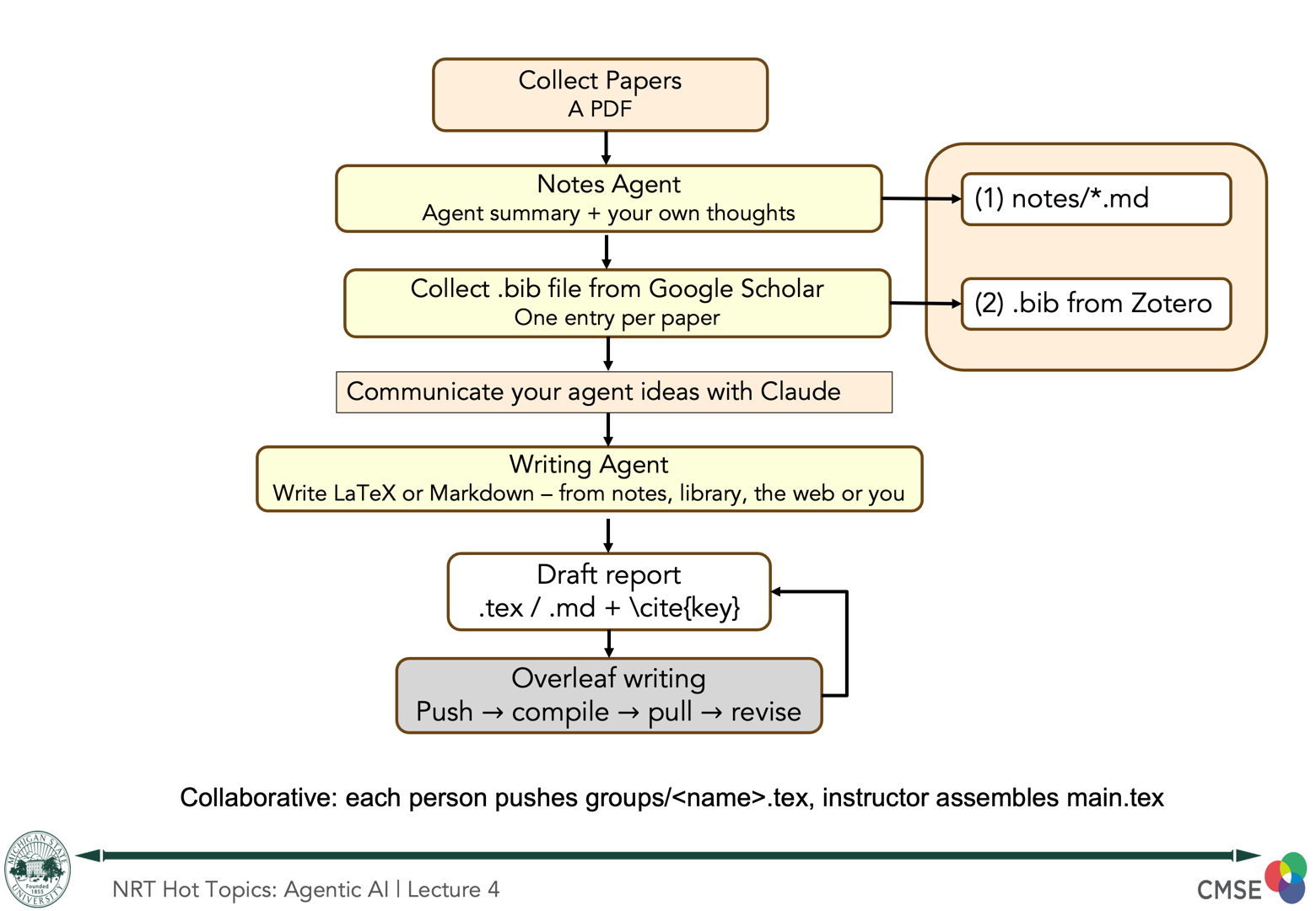
The steps: 0 Setup · 1 Collect · 2 Notes · 3 Bib · 4 Design · 5 Draft · 6 Upload · 7 Assemble · 8 A skill of your own · For the instructor
What you leave with
A section of a real LaTeX document, in a project the whole room contributed to, describing an agent tool you actually want to build — with citations to the papers or documents you brought, and a list of the things you could not support.
Not a toy. The plan is the thing you would hand a collaborator, or give to Claude Code next week as the brief for building it.
sources/        whatever you collected — papers, decks, posts, SOPs, code
sources/notes/  one structured note per source
refs/refs.bib   the sources you will cite
writing/        myplan.tex — the deliverable
.claude/        three subagents, two skills, one permission boundary
IDEAS.md        starter questions for the part that matters
tools/          five Python tools that check things and fix nothing
0 · Setup — two minutes, in the room
cd Demo10_agent_design
python3 tools/doctor.py
python3 tools/snapshot.py
doctor.py needs python3 and Claude Code. It names everything else as optional and says why. You should see four ok lines under Core and nothing missing.
snapshot.py is the undo button: it zips your notes, refs and plan into .snapshots/ so an agent cannot lose work you wanted to keep, and --restore puts them back. Source PDFs are skipped — they are the one thing no agent will overwrite. That safety net is what makes it reasonable to let an agent write files at all.
There is no git in this package, and no shell scripts either. Every tool is Python, so Windows needs python3 and nothing else — no Git for Windows, no Git Bash, no WSL. The earlier draft of this demo required all three, for one reason: two of the five tools were .sh files. Porting them removed the requirement rather than documenting it. If you already use git, git init && git add -A && git commit is better than the snapshot and you should use that instead.
1 · Collect your sources — 10 min
cp ~/Downloads/*.pdf sources/Not just papers. Anything that describes the work your agent would help with, or the problem it would solve:
| what | how it gets in |
|---|---|
| papers, preprints | .pdf — Claude reads these directly |
| slide decks | .pptx, via tools/totext.py — or export to PDF |
| reports, SOPs, protocols | .docx, .pdf, .md |
| blog posts, docs pages | save the page first — Print → Save as PDF |
| meeting notes, emails | .md, .txt |
| a README or a script | code counts, and is often the most honest source you have |
Two or three is plenty. This is not a literature review; you want enough that the tool you design has something concrete to be about.
Decks and Word files need one command
A .pptx or .docx is a zip of XML. pdftotext fails on one, nothing renders it, and strings finds nothing once the zip is compressed — so out of the box they are simply unreadable.
python3 tools/totext.py sources/deck.pptx      # slides + speaker notes
python3 tools/totext.py sources/report.docx
python3 tools/totext.py sources/post.html      # script, style, nav stripped
Standard library only, nothing to install. Verified against a real 62-slide deck: 62 slides and 62 speaker-note blocks out, in order. A deck that is entirely images extracts nothing — export it as PDF and let Claude read the pages.
Why you have to save a web page rather than paste the URL. The notes agent has no WebSearch and no WebFetch. Given a link, an agent that can browse will write a fluent, confident note from an abstract, a landing page, or a search result — and that note is indistinguishable from one written from the source. Saving the page takes five seconds and removes the whole failure mode. The cost is real and worth feeling: this is the capability layer working on you as well as for you. The writer agent does have web tools, because in a draft “found this online” is a legitimate tier that gets marked as such.
Nothing to hand? sources/README.md lists three real open-access papers (CC BY 4.0, you may cite them) that share one question and disagree about it.
sources/ is flat, on purpose. A document can be relevant to two things at once and a folder can only hold it in one place. The test before you ever add a subfolder: can one document belong to two of these at the same time? If yes, it is a field, not a folder — put it in the note's frontmatter and generate a view.
2 · Turn them into notes — 20 min
claude
/agents          # notes, writer, citecheck
Then once per document:
It works out how to read the thing, writes sources/notes/<name>.md against a fixed eight-section template, sets kind: to what it actually is, and adds one row to sources/_index.md.
The template fits a blog post as well as a paper, and the sections that go thin are the point:
| section | for a paper | for a launch post |
|---|---|---|
## What it is | a 2019 randomised trial | a vendor post — and who benefits from believing it |
## Evidence given | 0.71 → 0.78 AUC, Table 2, n=418 | none — asserted, not shown |
## Limits | what the design cannot tell you | usually the most useful section on the page |
Writing “none — asserted, not shown” is a finding, not a hole in your note. check_notes.py only expects numbers in ## Evidence given when kind: is paper or preprint; it does fail on an empty one, whatever the kind.
It cannot fetch anything. Its tool list is Read, Write, Glob, Grep, Bash — no WebSearch, no WebFetch. If the document is not already in sources/ it says so and stops. That is deliberate: an agent that can browse will write a fluent, confident note from an abstract or a publisher blurb, and that note is indistinguishable from one written from the paper. Note that the writer agent does have web tools. The writer may browse; the filer may not.
Check it with a tool that repairs nothing
python3 tools/check_notes.pyIt reports and fixes nothing, deliberately — a checker that edits is one that can make its own findings disappear. Two of its warnings are worth triggering on purpose so you see them:
Then read one note like a reviewer
## My take is empty. It always is. No agent writes there. In six months it is the only section you can trust to be your own thinking.
## Problem and aim comes before ## Claim. A note that opens with the claim has already accepted the document's framing. What did they think was missing, and was the gap real?
## What it is is the provenance line, and it earns its place on the things that are not papers. A vendor post claiming a tool saves 40% is evidence of a claim, not of 40%.
## Relevance to my tool is the bridge to step 4. It is the agent's guess at why you collected this. Argue with it — the argument is most of what step 4 needs.
3 · A .bib entry for anything you will cite — 5 min
Only for real publications. Skip this entirely if your documents are internal; a plan with no citations is a fine plan.
Easiest route: on the paper's own page, find Cite or Export citation and choose BibTeX. Every major publisher has this.
No publisher page? Paste the DOI into doi2bib.org and copy what comes back.
Paste the entry into refs/refs.bib, then rename the cite key so it starts with your first name and a colon:
@article{alice:horne2012,          # was horne2012pharmacogenetic
  title  = {Pharmacogenetic warfarin dose refinements},
  year   = {2012},
  doi    = {10.1160/TH11-06-0388},
}
The prefix is not decoration. In step 6 twenty people paste into one shared refs.bib. Two identical cite keys make BibTeX fail, and the damage is not local:
Measured here, not assumed. A .bbl is still written with the duplicate dropped, but latexmk stops before the pass that would use it — which is why the whole bibliography vanishes rather than losing one row. One person's collision breaks everybody's PDF.
The opposite failure is worth knowing too, because it is the quiet one: a cite key with no entry renders (?) for that one citation and latexmk exits 0. Nothing fails. You would find it at proof stage, or a reviewer would.
python3 tools/bibcheck.pyDuplicate keys across every file you give it, keys with no prefix, and entries with no DOI. Keep the doi field — it is the only identifier that survives moving between tools, and it is how citecheck joins your notes to your citations. Google Scholar's BibTeX export does not include one, which is why it is not the route recommended here.
4 · Design your agent, out loud, with Claude — 15 min
This is the part the rest of the session exists for. Everything before it is preparation; everything after it is write-up.
Open IDEAS.md for starter questions, then talk:
The skill is under instruction to ask you four questions and wait before proposing anything:
- What is the input, concretely? If the answer is abstract, it asks for a real example.
- What is the output, and how would you know it was wrong? If the answer is “I would read it carefully”, the design is not finished. What is the check?
- What must it never be able to do? Not should not — could not. That answer becomes a missing tool or a deny rule, not a sentence in a prompt.
- How often, and who else sees the output? Runs once → just ask. Runs weekly → a skill. Other people depend on it → the failure modes have to be written down.
Then it proposes, and the proposal has to place every rule in the lowest layer that can hold it:
| layer | where it lives | what it is |
|---|---|---|
| context | CLAUDE.md | a request. It can be misread, or forgotten the first time a fix looks obvious mid-task. |
| permission | .claude/settings.json | a refusal. The call is blocked. |
| capability | a subagent's tools: list | an absence. There is nothing to call, so there is nothing to argue with. |
If every rule in the proposal lands in “context”, say so and try again. That is the most common failure of a first design, and catching it here costs fifteen minutes instead of a term.
Starter questions, if the room goes quiet
- What did you do more than three times last month that felt mechanical?
- What do you explain to every new student, in the same words?
- Which step in your analysis do you most often get wrong, or skip?
- What do you not do, because doing it properly would take a week?
Vague targets produce plans that read well and cannot be built. Push for the concrete version:
| vague | concrete |
|---|---|
| “help with my literature” | “given a PDF, tell me whether its cohort overlaps a paper I already filed” |
| “clean my data” | “given a plate-reader CSV, flag wells outside 3 SD and write a one-line log” |
| “help me write” | “given a results table, draft the paragraph in my group's house style” |
The skill ends by naming the one assumption that, if wrong, makes the whole design pointless, and how you could check it this week. Every design has one.
5 · Draft the implementation plan — 25 min
Six subsections, and two of them are the ones people skip: Design, which must name the layer for each rule and say why not a weaker one, and How it can fail, which needs at least three failure modes each paired with the check that catches it. A plan with no failure modes has not been thought about.
What comes back marks where every claim came from:
| marker | means |
|---|---|
\cite{alice:horne2012} | in refs/refs.bib, and there is a note saying you read it |
% [UNREAD: key] | the agent read the PDF just now. You have not. |
% [WEB: url] | found online, not in your refs. Not a citation yet. |
% [GAP: …] | nothing supports this. Say so rather than writing smoothly. |
The last three are LaTeX comments, so they never typeset — but they stay in the source where you and anyone reading it can see them. Leave the gaps in. They are the plan telling you what you still have to find out, and \subsection{Open questions} is where they get promoted to prose. Deleting them so it reads finished is the one move that turns an honest plan into a confident wrong one.
A [WEB:] marker is settled by sending it round the loop again: decide the source is worth keeping, get its BibTeX, paste it into refs.bib with your prefix — and only then is it a real \cite{}. Free to write from anything; not free to cite anything.
Check the citations with an agent that cannot edit
It works cheapest-first: your notes, then the .bib as a lookup, and it opens a PDF only when those cannot settle the claim. It distinguishes confirmed by a note you read from confirmed by a note nobody read — the second is fidelity to your own summary, which is not the same as truth.
Expect several cannot verify verdicts and treat them as correct.
head -6 .claude/agents/citecheck.mdLook at the tools: line — Read, Glob, Grep, Bash. There is no Write. Now ask it to fix something and watch it decline, not because it was told to but because there is nothing to decline with. That is the bottom layer, and it is the only one that cannot be talked out of.
Last check before you upload
python3 tools/texcheck.py writing/myplan.texThree things, and they are specifically the three that break somebody else's build:
It does not need LaTeX installed. It is a text check, because requiring a TeX install would have excluded half the room — and because what it is looking for is visible in the source anyway.
6 · Upload to the shared Overleaf project — 10 min
The link is on the slide. It opens the project with edit access.
- Rename your file. In Overleaf, select the
groupsfolder, then Upload:groups/firstname-lastname.tex # e.g. groups/alice-nguyen.texUpload it as
myplan.texand you will silently overwrite whoever went before you. Say the filename out loud before anyone uploads. - Paste your entries into
refs.bib, at the end. Your keys are prefixed, so nothing can collide. - Add one line to
main.tex, in the marked block:\input{groups/firstname-lastname}
Overleaf is a real-time collaborative editor, so twenty people each adding one line to main.tex is exactly what it is built for. Watch the PDF rebuild with your section in it — that is the moment the session is for.
7 · The instructor assembles — 10 min
Live, on the projector. Compile, look at what twenty people produced in one document, and see what broke.
Something usually does, and that is the useful part. The three failures in order of likelihood are in the instructor notes below, with the fix for each.
8 · If time: a skill of your own — 15 min
A skill is a folder with a SKILL.md in it. Open .claude/skills/design/SKILL.md — that is the entire format: frontmatter with a name and a description, then instructions.
| use it when | |
|---|---|
| subagent | the point is a narrower tool list — it must not be able to do something, or it needs its own context window |
| skill | the point is a consistent procedure — the same steps, the same order, every time |
| neither | it runs once. Just ask. Do not build a thing. |
citecheck is an agent because the point is what it cannot do. design is a skill because the point is the order it works in.
For the instructor
The package ships an instructor/ folder with main.tex, a worked example-plan.tex, and the setup steps. Fifteen minutes, once, before the session.
- New Project → Blank Project. Upload
main.tex, replacing the default. - Create a
groupsfolder and uploadexample-plan.texinto it. It gives the class something to look at and proves the\inputwiring works before anyone depends on it. - Create
refs.bibat the top level and paste in the header comment from the package'srefs/refs.bib, so the key-prefix rule is visible to anyone who opens it. - Recompile. Title page, table of contents, one example section. If it does not work now it will not work with twenty people in it.
- Share → link sharing → anyone with the link can edit. Put the link on a slide, not in the downloadable package.
When it breaks
| symptom | cause and fix |
|---|---|
Every citation is (?), the References section is gone, the log says Repeated entry | Two people used the same cite key. Download the project (Menu → Download → Source) and run python3 tools/bibcheck.py refs.bib — it names the duplicate. Prefix one and recompile. |
File groups/xyz.tex not found | The \input line was added but the upload failed, or the filename does not match. Check the file tree. |
Something unhelpful about a missing \begin{document} | A stray \documentclass or \usepackage inside a group file. texcheck.py catches this before upload, which is why it is in the attendee steps. |
One citation is (?), everything else is fine, exit code 0 | That key has no entry. Localised and silent — the opposite of the duplicate failure. |
Afterwards, turn link sharing off. The link grants edit access to anyone who kept it, permanently. Or treat the project as disposable and abandon it.
What it teaches
- Three layers, and they are not interchangeable.
CLAUDE.mdis a request,settings.jsonis a refusal, a subagent's missing tool is an absence. Put each rule in the lowest layer that can hold it. The design conversation in step 4 is an hour of practice at exactly this. - A verifier that can edit is one you cannot trust. It can make its own findings disappear.
citecheckhas noWrite, and neither doescheck_notes.py. - The agent that files may not browse; the agent that writes may. A note written from an abstract looks exactly like one written from the paper. The only reliable prevention is removing the tool.
[GAP:]is a result. Deleting the gaps so a plan reads finished is how a confident, wrong document gets written.- Folders may encode lifecycle, never classification. The test: can one thing be in two of these at once? If yes, it is a field.
- A requirement you can delete is better than one you document. This package needed Git for Windows, Git Bash and WSL instructions for exactly one reason: two of its five tools were shell scripts. Porting them to Python removed three dependencies and a paragraph of caveats. Look for that shape in your own design.
- The cheap check that runs before the expensive one.
texcheck.pyis a text scan with no LaTeX;bibcheck.pyis a regex over a.bib. Between them they catch the three failures that would otherwise surface as a broken compile in front of twenty people.
Making it yours
- The seven note sections in
.claude/agents/notes.mdare a starting point. Rewrite them for what you actually need to remember about a paper in your field. IDEAS.mdis yours. The sentence you write at the bottom before the session is worth comparing with the plan you have at the end of it.- The
designskill's four questions are the part most worth adapting. If your group has a fifth question it always asks, add it. - Want the reference manager, the Word exit, and git? That is Demo 10x — same shape, more machinery.